
By Digital Learning Specialist Amelia
Think of your computer keyboard as a modern version of the classic typewriter, only smarter. It’s your primary tool for typing text, entering commands, and interacting with your computer. Whether you’re writing an email, browsing the web, or playing a game, the keyboard is where it all begins.
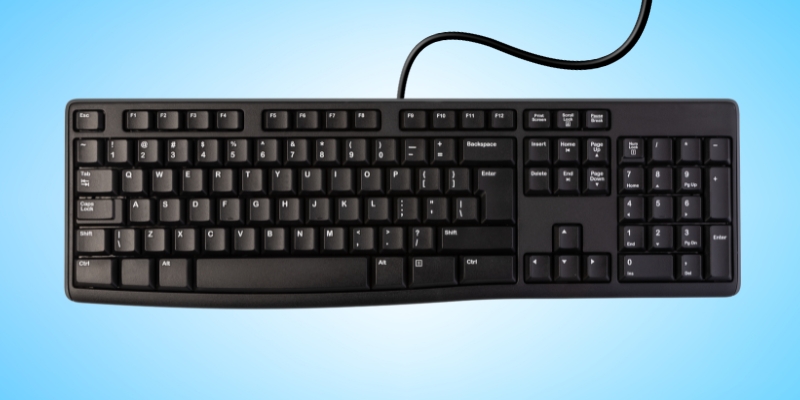
Most keyboards use the QWERTY layout (pictured above), named for the first six letters in the top row. While there are other layouts, QWERTY is by far the most common and the one most people learn first. No matter the brand of your computer, the general layout stays familiar, though some special or function keys may vary slightly.
Keys you’ll use most
- Letters and numbers: Just like a typewriter, these keys are used for basic typing.
- Spacebar: The long bar at the bottom; press it to create spaces between words.
- Backspace (Windows) or Delete (Mac): Deletes characters to the left of the cursor.
- Enter or Return: Starts a new line or confirms a command; think of it as an “OK” button.
- Shift: Hold it down to type capital letters or the symbol shown at the top of a key (e.g., the punctuation symbols above the number keys).
- Caps lock: Press once to type in all capitals; press again to turn it off.
- Arrow keys: Move your cursor up, down, left, or right.
Handy keyboard insights
- Escape (Esc): A quick way to cancel or exit an action.
- Enter or Return: Often used to confirm, continue, or execute a command.
- F and J: Notice the small raised bumps? They help you position your fingers correctly for touch typing without looking.
Mastering these basics can make using your computer faster, easier, and far more enjoyable. With just a little practice, your keyboard becomes second nature, almost an extension of your fingertips.
Want to learn more?
- Computer basics 101: The mouse: Learn the basics of this other essential piece of hardware to quickly and confidently navigate the computer.
- Copy, cut, and paste shortcuts: Use these keyboard shortcuts to move text and images around with ease.
Have a tech question?

About Amelia
Part concertgoer, part bibliophile, part audiophile, half theatrical skills, half creative journaling. Amelia is part of the digital learning team as a specialist who seeks to bridge the gap between informal and formal digital literacy by emphasizing “we will learn together.”